High Level Introduction to CUDA
CUDA is an API primarily designed to work with languages such as C, C++ and Fortran. However, the Julia ecosystem has maintained, developed and built the CUDA.jl package. We will extensively use this package to interact with our GPU.
Installing CUDA.jl
Begin by verifying your current machine has an NVIDIA GPU. On Windows, one can use the Task Manager to do this:
- Open Task Manager (
Ctrl+Shift+Esc). - Expand to “More Details” with the button in the lower left-hand corner.
- Switch to the “Performance” tab
- In the left-hand column, there should be an option called GPU. Check the name of the GPU and ensure it says “NVIDIA” and note the device name.
- If an older card, or a mobile card for a laptop, search online1 for the CUDA Compute Capability of your card (e.g. the NVIDIA 1080Ti has a compute capability of 6.1.)
On other operating systems, one can use the command line tool - ”nvidia-smi” - to check the installed device. If this is not available, then you likely do not have an NVIDIA GPU, or you have not installed the NVIDIA proprietary drivers. If one has access to a machine with an NVIDIA GPU, you can remote into the machine with SSH and follow along there.
If you have a much older machine, you should find out the compute capability of your device. A low compute capability can severely limit the available features one can use. Anything above a CUDA Compute Capability of 5 should be enough for our purposes in this course.
To add the package, run:
using Pkg; Pkg.add("CUDA")This will add the Julia CUDA libraries, however, it will not install the necessary NVIDIA libraries. Fortunately, instead of having to manually install the CUDA SDK, Julia’s package manager enables artefacts to be downloaded that can replace this step. These artefacts are known to be compatible with CUDA.jl and only need to be downloaded once. To start this process, run the following:
using CUDA
CUDA.versioninfo()
This will download all the necessary dependencies needed for CUDA.jl to function.
Note: (Optional) If you want to make sure everything will work correctly on your machine, you can run the tests for the package using:
using Pkg;
Pkg.test("CUDA")
However, one should make sure that Threads.nthreads() is greater than 1 for this test as it can take a very long time to complete, even with multiple threads.
First Steps with CUDA.jl
Once installed, we can begin to explore how to use CUDA. Let’s test out a vector addition by using the in-built map! function.
n = 1_000_000;
a = rand(Float32, n);
b = rand(Float32, n);
c = similar(a);
function array_test!(c, a, b)
    map!(+, c, a, b);
    nothing
end
@btime array_test!($c, $a, $b);188.565 μs (0 allocations: 0 bytes)Here, we are storing the result of the addition of a and b in the array c.
For this course’s portable examples, a hidden setup block selects CUDA when an NVIDIA device is functional and AMDGPU when an AMD device is functional. The to_gpu helper converts CPU arrays to the selected device-array type:
a_gpu = to_gpu(a);
b_gpu = to_gpu(b);
c_gpu = similar(a_gpu);
For CUDA specifically, the equivalent transfer is cu(a); for AMDGPU it is AMDGPU.ROCArray(a). We can now perform the same operation using device arrays:
array_test!(c_gpu, a_gpu, b_gpu);Note that this will take a long time on the first execution due to the compilation. After the first run, it should be fast.
We can copy the c_gpu array back to the CPU using Array to compare the results to see if we get the correct answers:
using Test
c_cpu = Array(c_gpu);
@assert isapprox(c, c_cpu)
We use the isapprox function since we are likely to encounter some floating point differences between the CPU and the GPU. This function ensures that the values are within acceptable limits to be considered equal.
One thing to notice here is that we did not change the function that performed the calculation. Instead, we only used generic Julia array operations (here, the map! function) and regular Julia functions. Under the hood, CUDA.jl defines specialised functions for performing these operations and is able to compile a kernel2 from the native Julia code. This is one of the core strengths of using Julia to program GPUs, one can write generic code that can run on both CPUs and GPUs, simply by changing the types of the array.
Before we benchmark this function, it is important to discuss how operations occur on a GPU. Firstly, most operations that occur on a GPU are performed concurrently (or asynchronously) to operations on the CPU. The CPU simply launches a kernel (a program) to run on the GPU and continues with operations. One must perform a blocking operation to wait until a kernel has finished computing to properly benchmark the execution time. To start with, let’s just benchmark the function how we always would:
@btime array_test!($c_gpu, $a_gpu, $b_gpu);3.041 μs (42 allocations: 2.30 KiB)However, if we wrap our code in a function which forces synchronisation, then we can measure the true cost of using the GPU:
@btime begin
    array_test!($c_gpu, $a_gpu, $b_gpu)
    gpu_synchronize($c_gpu)
end15.133 μs (42 allocations: 2.30 KiB)We can see that the time taken is now much longer. This is a more accurate benchmark for this function. One should always make sure that when benchmarking, one is not just measuring the time taken to launch the kernel.
From the benchmarks, one can see that the GPU was able to perform this task around 12 times faster than the CPU (single thread). The figure below shows the comparison between the single core CPU speed and the GPU performance, varying with system size.
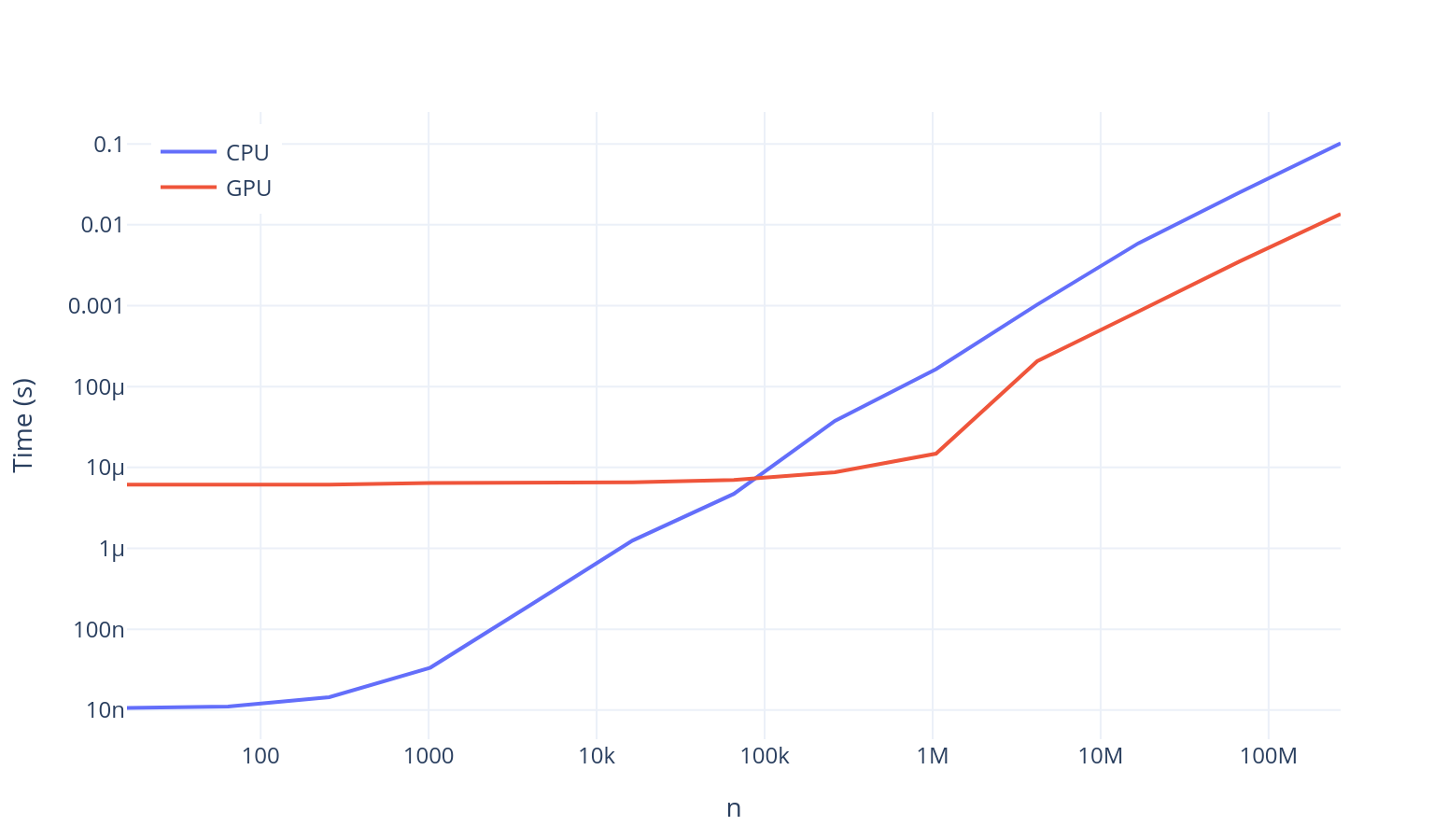
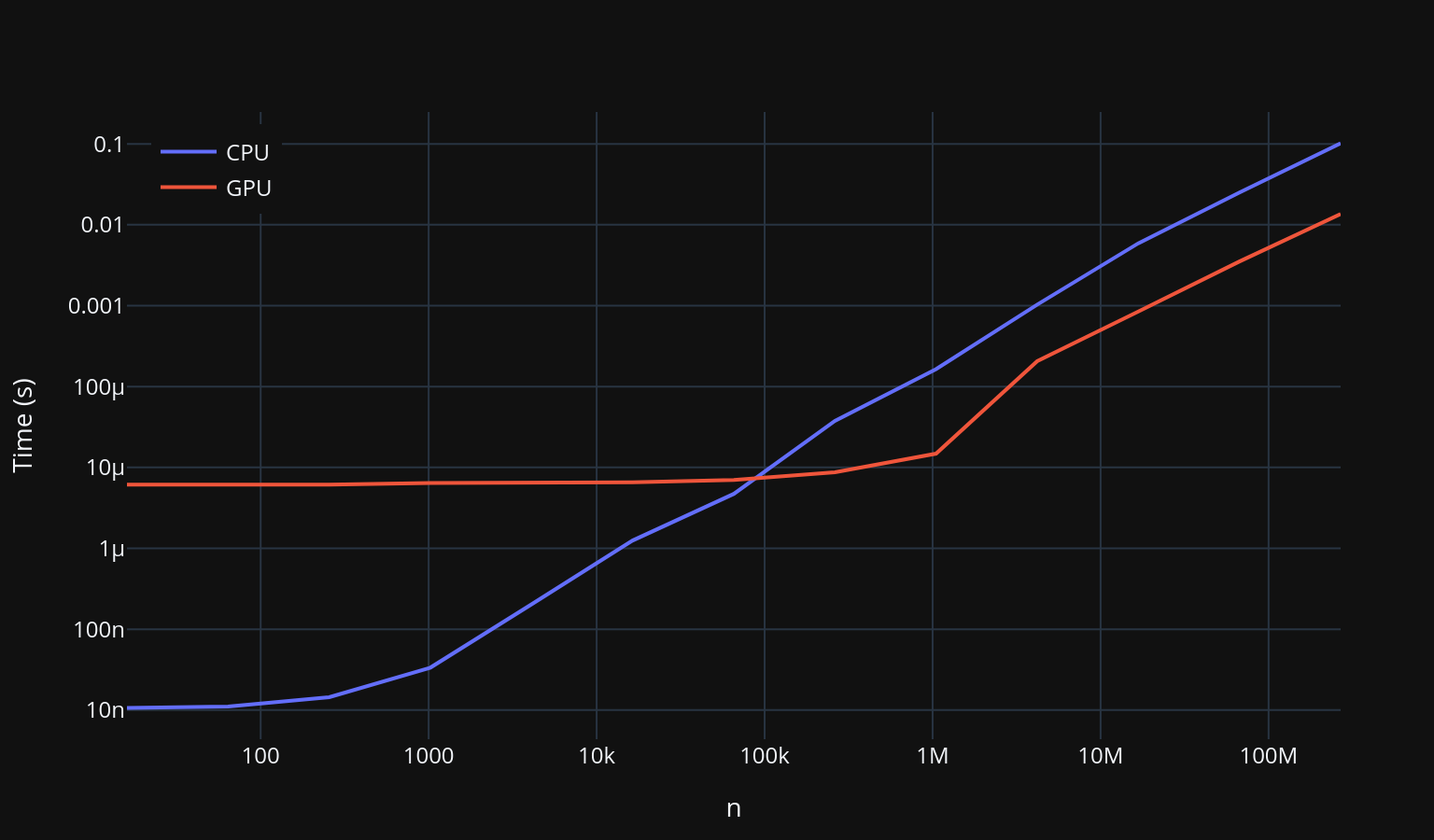
From the figure above, we can also deduce that the time taken to launch a kernel is between a hundredth of a millisecond and a tenth of a millisecond. It is not worth using a GPU to perform operations on this scale unless you have a significant amount of work for it to do. We can see that we need to use vectors of a size of around to see a significant difference for the addition.
The performance increase may not seem like much on this graph, but it is important to remember the log-log scale. We are often seeing a 10 to 20 factor of performance increase on the GPU. This sort of performance difference throughout an application can mean the difference between the code taking multiple weeks to complete, to being able to be executed in a single day.
Hopefully this example demonstrates that Julia makes it relatively straightforward to write code for the GPU, provided that we can translate our algorithms to use broadcasting operations. This has the added benefit of being able to switch the types of our data and run code on the different devices. The CUDA.jl library can even compile native Julia functions into a CUDA kernel.
Why was it important to use broadcasting? This is because accessing elements of a CUDA array is very slow as indexing operations are calculated on the CPU, requiring synchronisation between the CPU and the GPU. This causes a huge performance hit. Scalar indexing is often disallowed by default because it is almost always not what you want to be doing and causes huge performance hits. One may see this error when switching your data types into CUDA arrays:
a_gpu[1]ERROR: Scalar indexing is disallowed.
Invocation of getindex resulted in scalar indexing of a GPU array.
This is typically caused by calling an iterating implementation of a method.
Such implementations *do not* execute on the GPU, but very slowly on the CPU,
and therefore should be avoided.
If you want to allow scalar iteration, use `allowscalar` or `@allowscalar`
to enable scalar iteration globally or for the operations in question.This is the most common reason why functions from other libraries are not compatible with CUDA. This incompatibility is the largest downside of using CUDA.jl and GPUs in general. Often, one will have to find the correct library or function to use, which is compatible with CUDA. Thankfully, the CUDA.jl library includes the entire set of C functions which can be used with your arrays, which means there is no reason to move to C to find any functionality missing in Julia. In addition, any missing functionality can be implemented yourself by writing your own CUDA kernels - this will be the topic of the next section.
Footnotes
- A list can be found here - https://developer.nvidia.com/cuda-gpus.↩
- A kernel is a program/algorithm that operates on a GPU.↩