Using Julia on the HPC
This post was first published as a guest post on the University of Nottingham’s Digital Research blog, which is no longer online (an archived copy survives). It accompanied a talk at the 2022 UoN HPC conference. I have lightly revised it, redrawn the figures as interactive plots from the original benchmark data, and added an explanation of where Julia’s speed advantage over C++ comes from. The code is in this repository.
In this post, I explore the speed and efficiency of the programming language Julia on a university high-performance computing (HPC) cluster.
What is Julia?
Julia is a modern, general-purpose programming language, designed for high-performance scientific programming. According to a blog post written by its creators, Julia was borne out of the desire for a language which is as fast as C, yet as easy to use as Python, MATLAB and R. Personally, I use Julia because it is incredibly easy to prototype new code for my research, while being flexible enough to execute that code on my home machine, my GPU or an entire cluster. And all of this with minimal effort on my part!
In this post, I discuss what’s possible in Julia for very little investment. You will see how to write reusable code and take advantage of every level of parallelism, from the hardware parallelism of SIMD, to executing native Julia code on the GPU and scaling it across a cluster. The ease of use and flexibility of this parallelism provides a very low bar to entry.
Julia is fast
Julia has many advantages over other languages, but the one that will interest the HPC community most is speed. Julia claims to be as fast as C, so let’s put that to the test.
I will use the example of simulating a Monte Carlo process, specifically a random walk. This process is simple, but the basics are used in a wide variety of fields and are common in HPC workloads. The code for running a random walk is:
using Random

function simple_monte_carlo(n, T)
    x = zeros(n)
    for i in eachindex(x)
        for t in 1:T
            x[i] += Random.randn()
        end
    end
    return x
end
This function performs random walks, all of length . We can write some roughly equivalent code in C++, to see the empirical differences in performance:
double *random_walk(size_t n, size_t T, std::normal_distribution<double> randn, std::mt19937_64 rng)
{
    double *x = new double[n];
    for (size_t i = 0; i < n; i++)
    {
        double x_t = 0.0;
        for (size_t t = 0; t < T; t++)
        {
            x_t += randn(rng);
        }
        x[i] = x_t;
    }
    return x;
}
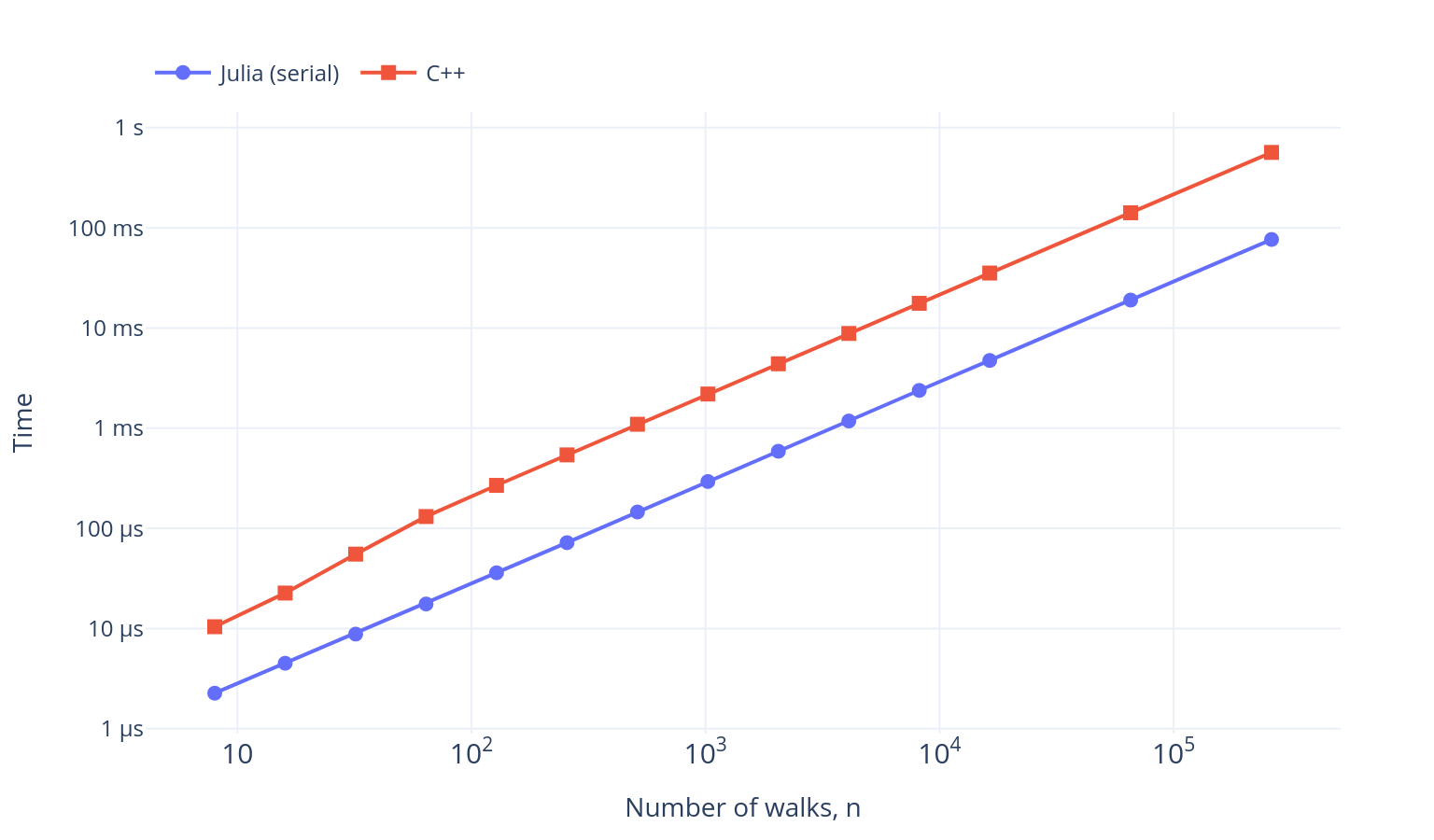
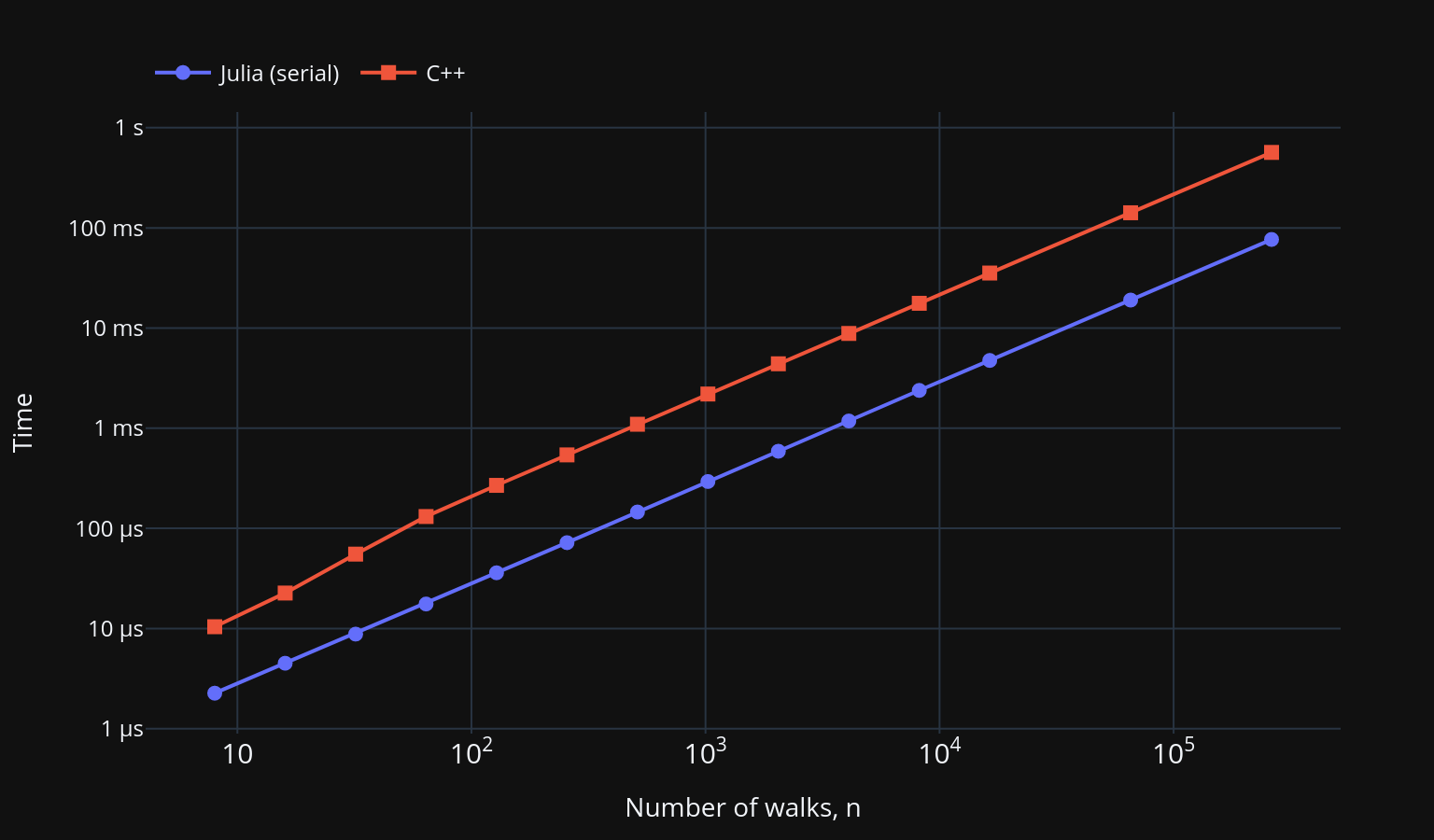
This C++ implementation is not optimal (I am no C++ programmer), but it is indicative of what a typical PhD student might write for their simulations. With , the Julia version is between 4.5 and 7.5 times faster, depending on the size of , as shown in Figure 1.
Why is Julia faster here?
I don’t think that Julia is inherently faster than C or C++, and the main reason for the difference here is not the compiler but the random number generator. Almost all of the work in a random walk is generating random numbers, so the choice of generator dominates the run time.
The C++ code uses std::mt19937_64, the 64-bit Mersenne Twister, which dates
from the late 1990s. It is a good-quality generator, but it carries a large
state of 312 64-bit words (about 2.5 KB), and every 312 numbers it stops to
regenerate the whole of that state. Since version 1.7, Julia’s default
generator has instead been Xoshiro256++, a much more modern design. Its state
is only four 64-bit words, which fit comfortably in registers, and each number
takes only a handful of shifts, rotations, XORs and additions. Even one number
at a time, that is considerably cheaper. Better still, this simple, branch-free
arithmetic maps directly onto SIMD instructions, which operate on several
values at once, so Julia can advance several Xoshiro streams in parallel within
a single core when filling arrays with random numbers. Julia also gives every
task its own Xoshiro state, which, as we will see, lets threaded code draw
random numbers without any locking.
A C++ developer could close most of this gap by swapping in a faster generator. The point I want to make is that Julia makes good choices like this by default, so you get C/C++ levels of performance for minimal effort, while keeping your code simple and trusting Julia’s just-in-time compiler (built on LLVM, like Clang) to produce fast machine code. Not all Julia code will run quickly, but the performance tips in the manual will get you to these C-like speeds.
Multi-threading in Julia
Almost every modern CPU has multiple cores, each providing additional compute
power. Julia provides lightweight multi-threading natively. The language offers
many ways of parallelising your code, but here we’ll just use a macro to make
the process easy. A macro is code that writes other code. To execute a loop in
parallel, we just add the @threads macro from the standard Threads library:
function simple_monte_carlo_threaded(n, T)
    x = zeros(n)
    Threads.@threads for i in eachindex(x)
        for t in 1:T
            x[i] += Random.randn()
        end
    end
    return x
end
This is essentially the same source code as above, with a single change in
front of the for loop. Julia must be started with more than one thread for
this to help, for example with julia --threads=8. We can compare its speed-up
over the serial version in Figure 2.
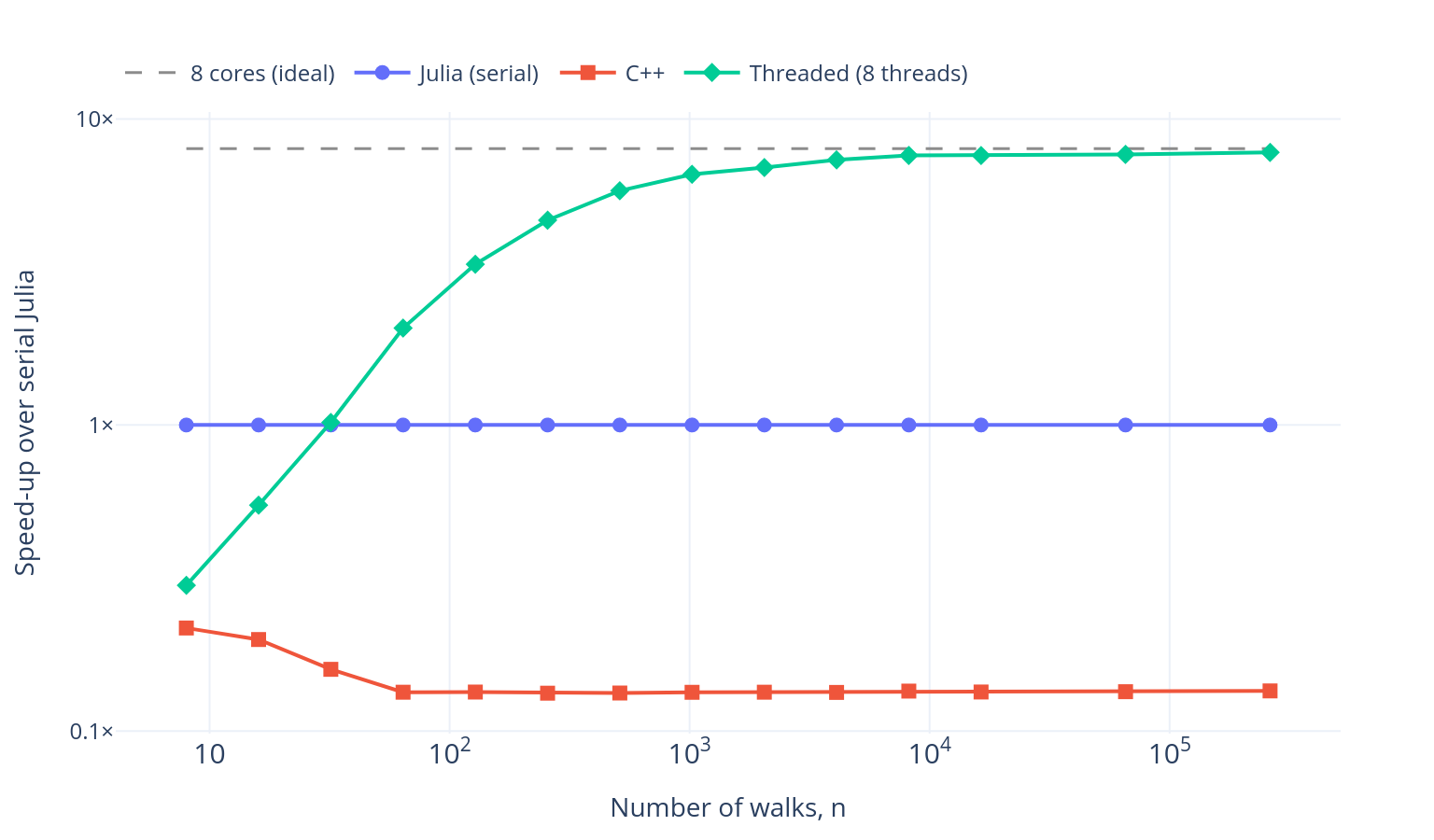
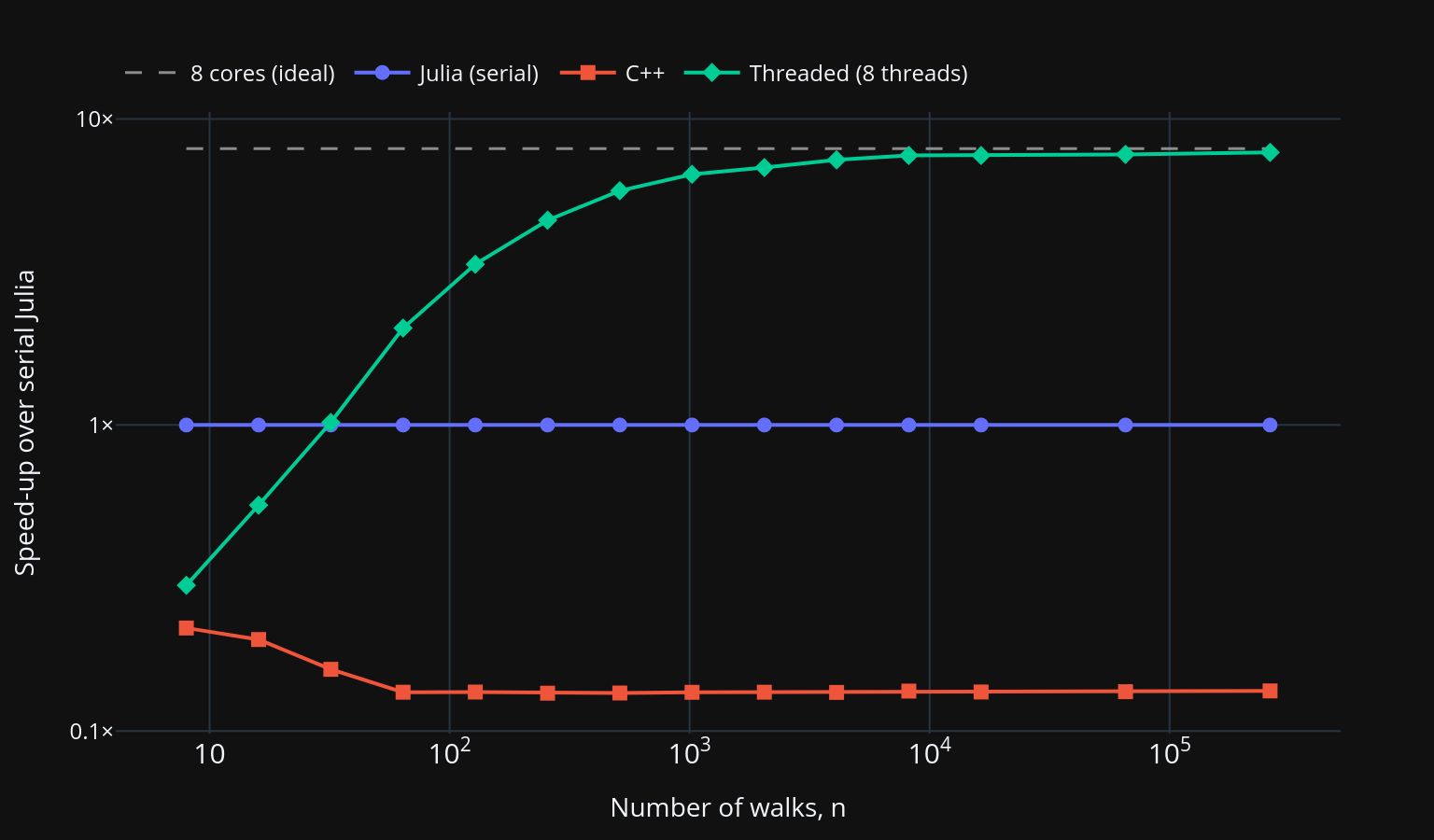
This is pretty good performance out of the box. For small , the overhead of starting the threads dominates and the threaded version is even slower than the serial one, but for large it approaches the ideal speed-up of 8 times. There are also techniques to reduce this overhead.
Moving to the GPU
The modern GPU excels at array-based operations at scale, such as standard BLAS operations (matrix multiplications, and so on), which make up the backbone of a lot of numerical and scientific computing. Writing code for a GPU is notoriously difficult, and writing custom kernels in C presents a high barrier to entry for beginners.
The good news is that Julia has a successful package, called CUDA.jl, which compiles native Julia code directly to GPU code. Let’s take it for a spin!
Up to now, we have only used Julia’s standard libraries, but there is a rich ecosystem of packages available. Adding a package is as simple as running:
using Pkg
Pkg.add("CUDA")
This uses Julia’s built-in package manager to download CUDA.jl. What makes this painless is that the first time you use CUDA.jl, it downloads the CUDA libraries it needs, instead of you having to install CUDA manually.
GPUs are very different devices to CPUs, with a different programming model. The main difference is that indexing individual elements of an array is very slow on a GPU, so CUDA.jl raises an error when you try to do it. Instead, we can use Julia’s excellent “broadcasting” notation, which lets us write concise, “vectorised” code. This notation also lets us write non-allocating code, which reuses memory, and that can make a huge difference to performance. Here’s the same random walk, rewritten with array operations that avoid allocating memory:
function random_walk!(x, T)
    fill!(x, zero(eltype(x))) # Set all elements of the x array to zero
    cache = similar(x) # Create a cache array of the same size and type as x
    for t in 1:T
        Random.randn!(cache) # Populate the cached memory with random numbers
        x .+= cache
    end
    return x
end

function simple_monte_carlo_array(n, T)
    x = zeros(n)
    random_walk!(x, T)
    return x
end
The ! at the end of a function’s name is a convention which tells us that
the function mutates its arguments.
This code runs on the CPU with ordinary arrays, and is very similar to how you would write it in MATLAB or NumPy. We can add its speed-up to the comparison in Figure 3.
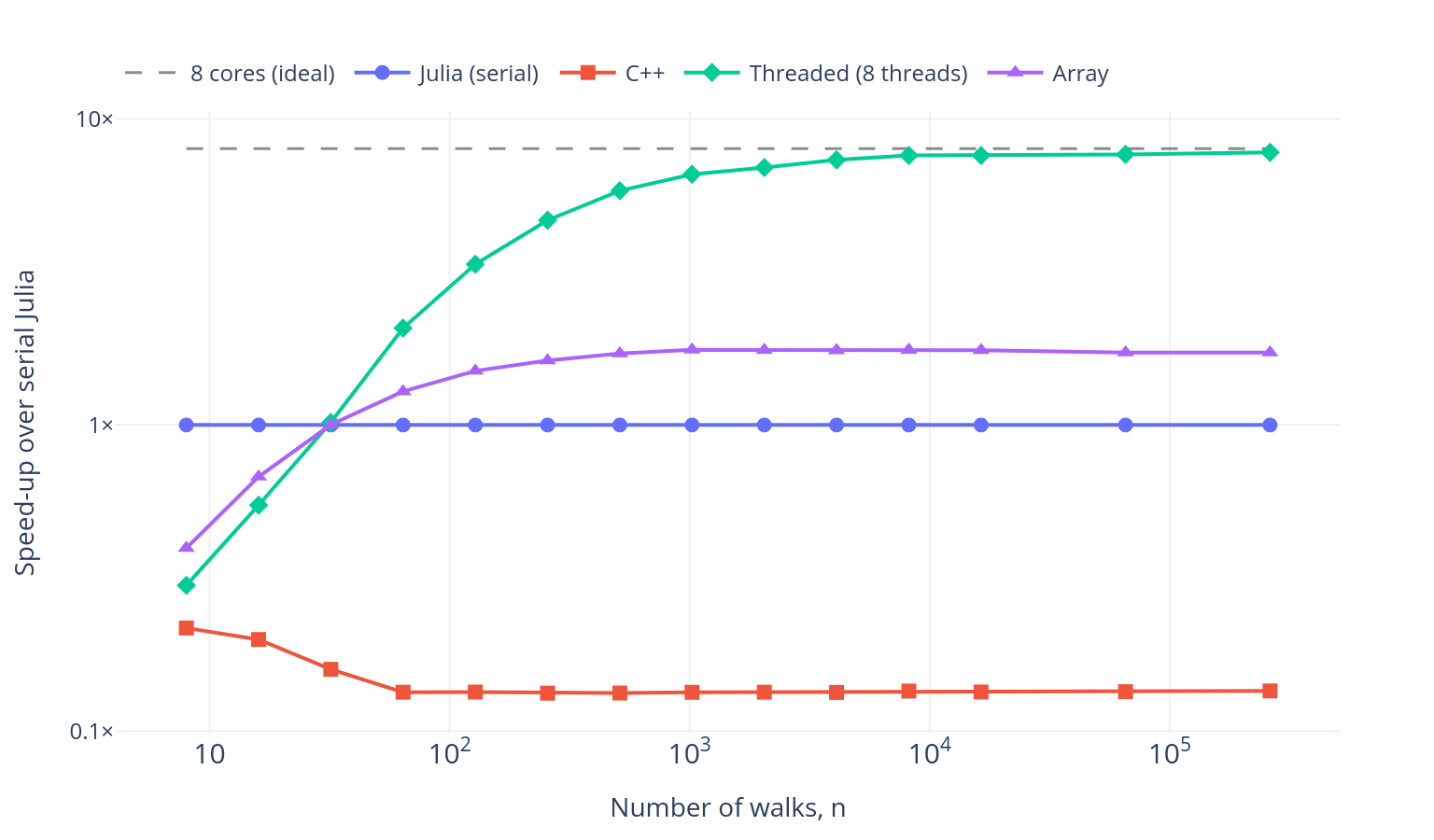
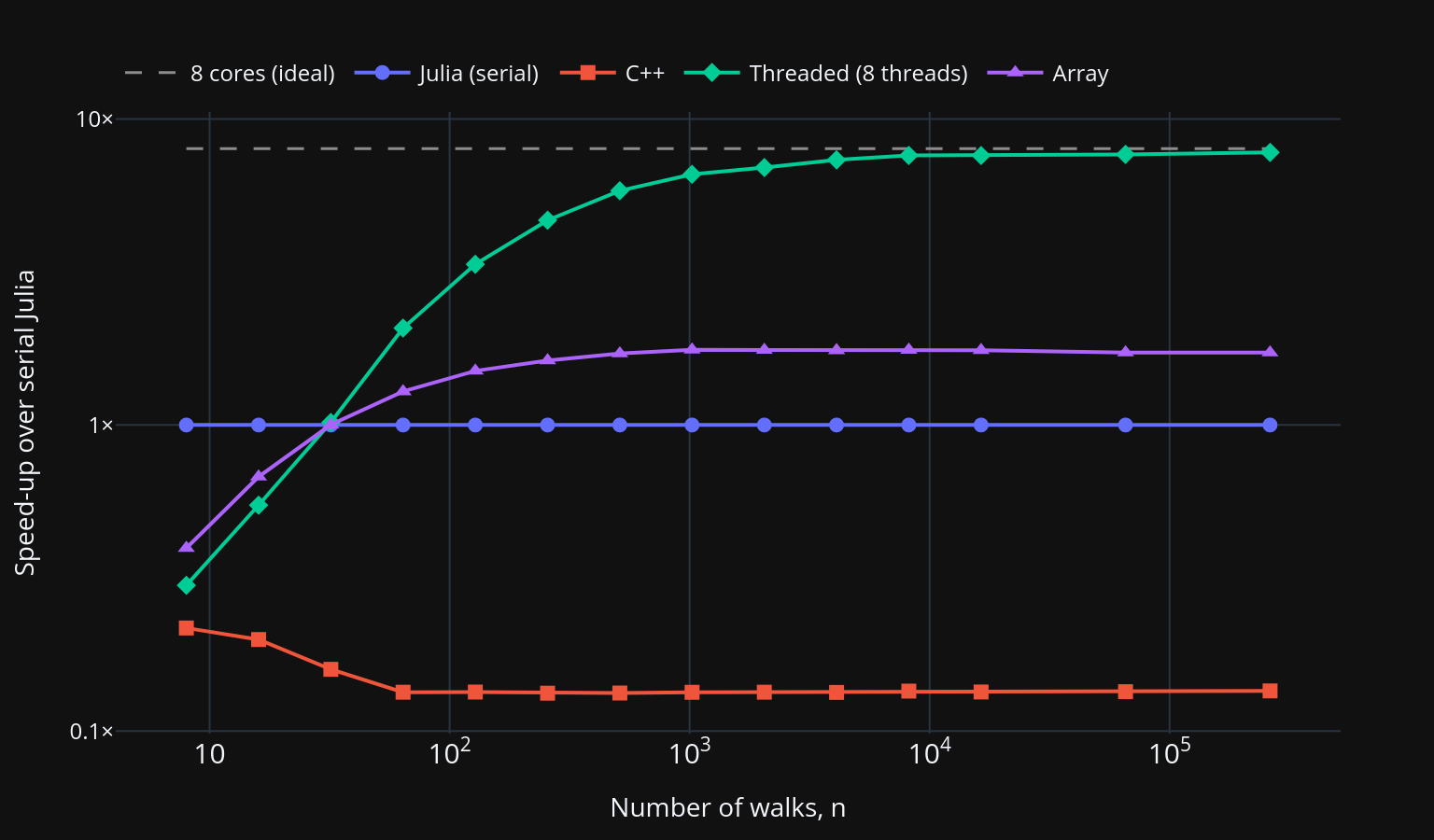
Even on a single core, this is around 1.7 times faster than the serial version for large , as the whole-array operations let the compiler make use of hardware SIMD instructions. What is really powerful about this approach is that we can reuse this code directly to run on the GPU:
using CUDA

function simple_monte_carlo_gpu(n, T)
    x = CUDA.zeros(n) # Creates a GPU array of zeros
    random_walk!(x, T) # Same function as before, but a different type of `x`
    return x
end
There are no changes to our random_walk! function! The only thing we changed
was the type of our array. Julia’s just-in-time compiler specialises code on
the types of its arguments, so it knows to perform all of the array operations
on x on the GPU. The performance is shown in Figure 4.
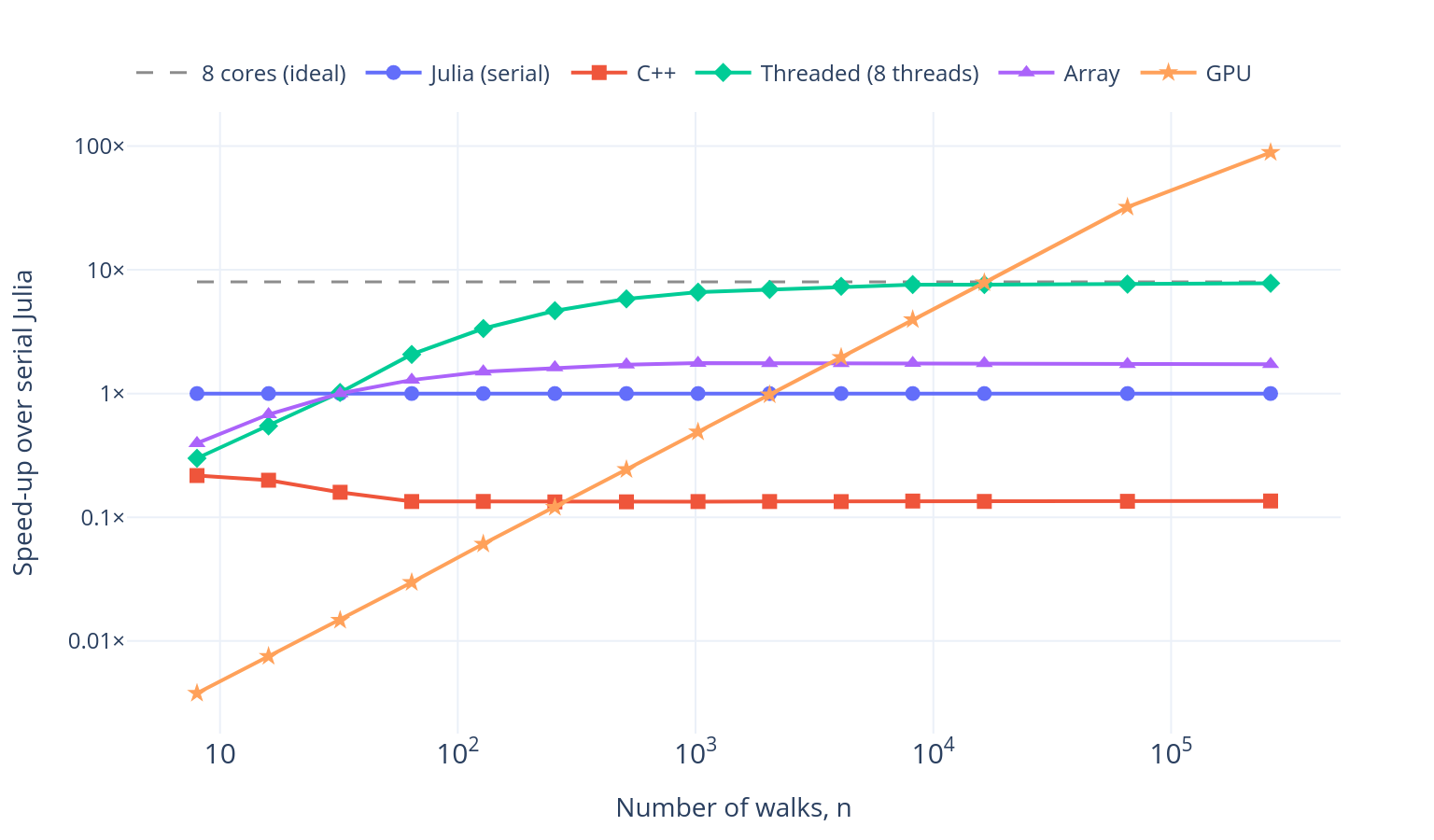
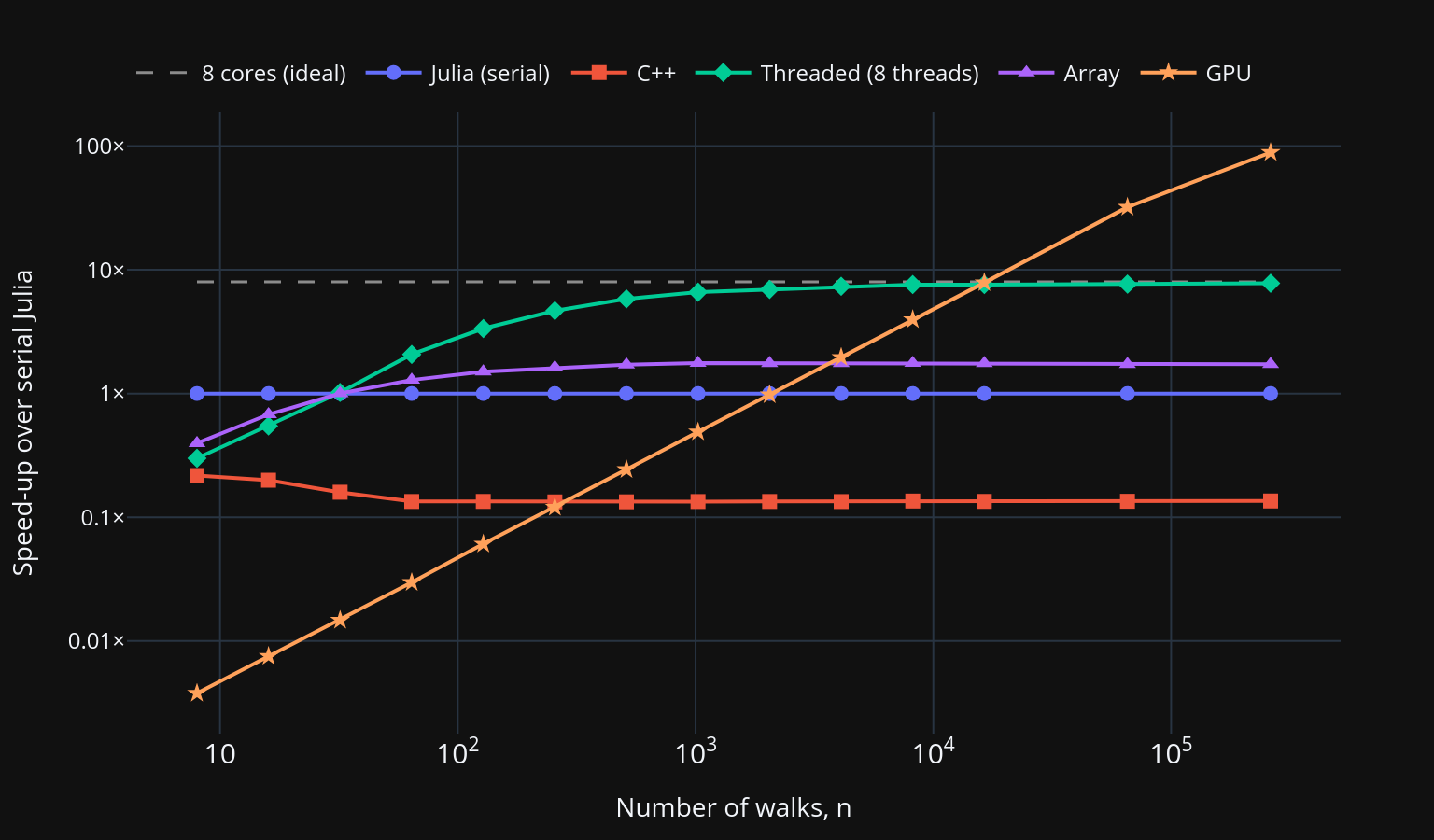
Launching work on the GPU has a fixed cost of around half a millisecond here, so it is only worth using for large arrays. But once we need millions of calculations, the GPU is around 90 times faster than serial Julia on the CPU, and still more than 10 times faster than all 8 threads. We got this huge increase in performance by changing only the type of the input to our function, reusing our original code.
We have only scratched the surface of GPU programming here, as you can always move on to writing your own kernels. For a more detailed review, see the CUDA.jl documentation. If you would rather not tie your code to NVIDIA hardware, KernelAbstractions.jl lets the same kernel run on NVIDIA, AMD, Intel and Apple GPUs, as well as the CPU.
Scaling up to a cluster
This wouldn’t be an HPC post without using a cluster. While a single node with multi-threading goes a long way, Julia also supports multiprocessing natively, to scale across many nodes, with the Distributed standard library, and supports schedulers like SLURM with ClusterManagers.jl. To start eight workers through SLURM, all we need to run is:
using Distributed
using ClusterManagers

addprocs(SlurmManager(8), exeflags=["--project"])
We could use the parallel primitives described in the Distributed
documentation, but let’s reuse our previous code and keep the array-based
programming model. The DistributedArrays.jl package provides the DArray type which, as the name suggests, splits the
memory of an array into blocks, one for each process:
@everywhere using DistributedArrays

x = dzeros(n) # A DArray of zeros, split between the workers
We would hope to copy the approach we took for the GPU:
function simple_monte_carlo_dist(n, T)
    x = dzeros(n) # Creates a Distributed Array (DArray) of zeros
    random_walk!(x, T) # Same function as before, but a different type of `x`
    return x
end
Unfortunately, this does not work on its own, as Random.randn! has no method
for the DArray type. But since our function maps neatly onto each block of
the DArray, we can write a specific method of random_walk! for this type,
with a little help from the DistributedArrays.jl documentation:
@everywhere function random_walk!(x::DArray, T)
    if myid() == 1 # The main process (not a worker)
        SPMD.spmd(random_walk!, x, T; pids=workers())
    else
        random_walk!(localpart(x), T)
    end
end
The @everywhere macro defines the function on every worker. Usually, you
would put all the code that the workers need in a separate file and load it
with a single @everywhere include("shared_code.jl").
This method tells Julia to call our original random_walk! on each worker’s
block of the array, reusing our code from before. The performance with 8
workers is added in Figure 5.
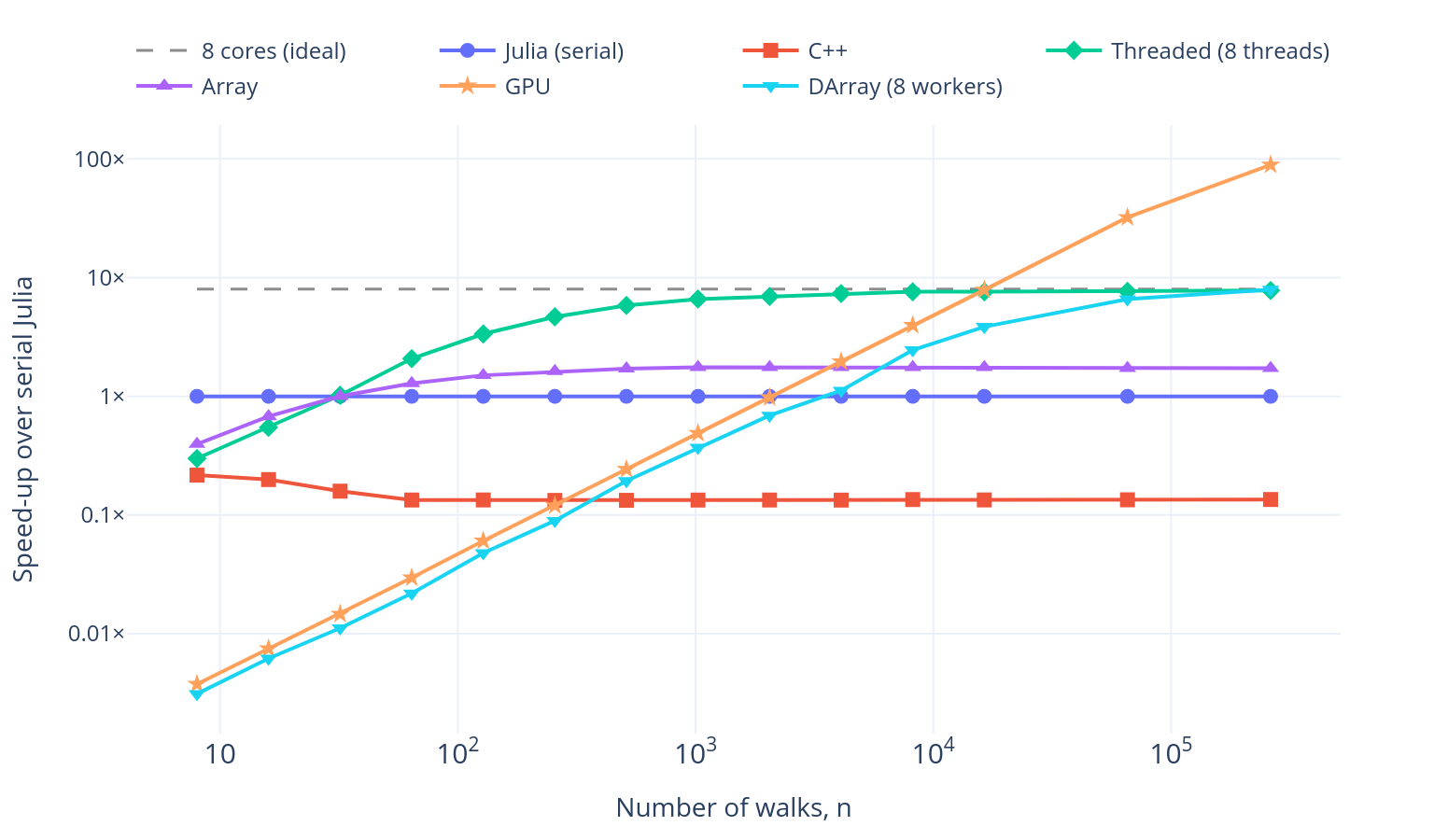
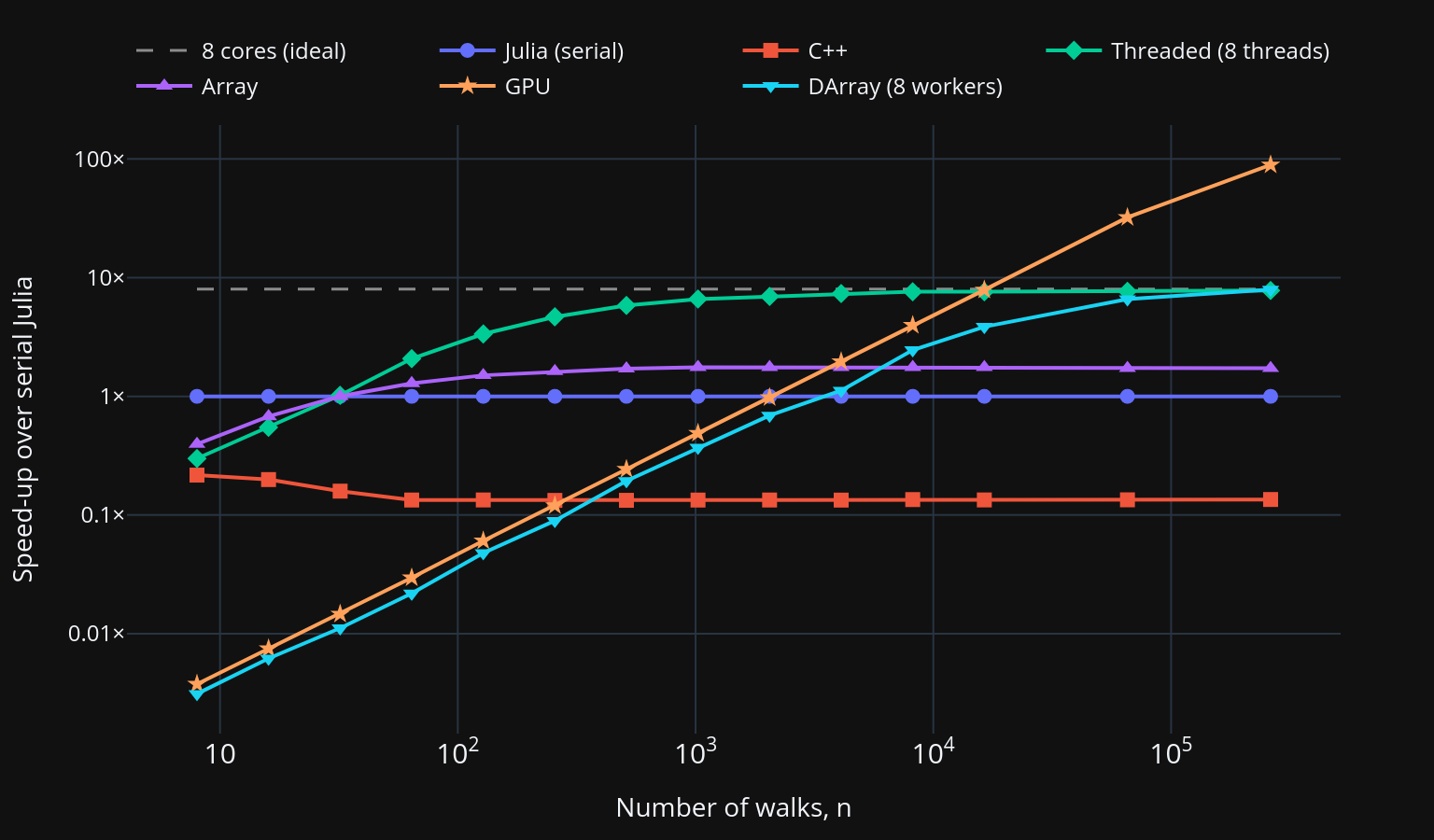
Multiprocessing always has a much higher overhead than multi-threading, as the processes must communicate by passing messages rather than sharing memory. In exchange, we can scale to thousands of processes and use the memory and resources of hundreds of different computers.
What’s next?
Hopefully, I have shown you the range of parallelism that Julia makes
available, and convinced you that there is a low barrier to entry to get
started! All of the code in this post can be found in the blog folder of this GitHub repository.
If you want to learn more about Julia, visit the website, and if you want to learn the language, start with the Julia manual.
I haven’t gone through many of the other reasons that people use Julia, such as multiple dispatch or its state-of-the-art support for differential equations and scientific machine learning. If the packages you need are only available in Python, PythonCall.jl lets you call Python code directly from Julia, giving you access to the entire Python ecosystem.
Finally, if you want to ask questions, there is a very active community on the Julia Discourse.
Happy programming!